 SurgePix Docs
Credit & Subscription
How Credits Work
Credits are how you pay for generation and editing on SurgePix. This page explains the two credit types, how long they last, and how usage is counted.
Two types of credits
- Plan credits — included with your plan and reset daily (the free plan gives 25 per day). They don't roll over: each day the previous balance expires and a fresh allowance is added.
- Reward credits — earned by inviting friends or publishing to the Community. They last longer than plan credits—valid for 90 days from the date you receive them.
How credits are spent
Both input and output count toward usage:
- Input (prompt) tokens and output (completion / image) tokens both consume credits.
- If a generation fails, you are not charged for the output—only the input is counted.
Where to see your usage
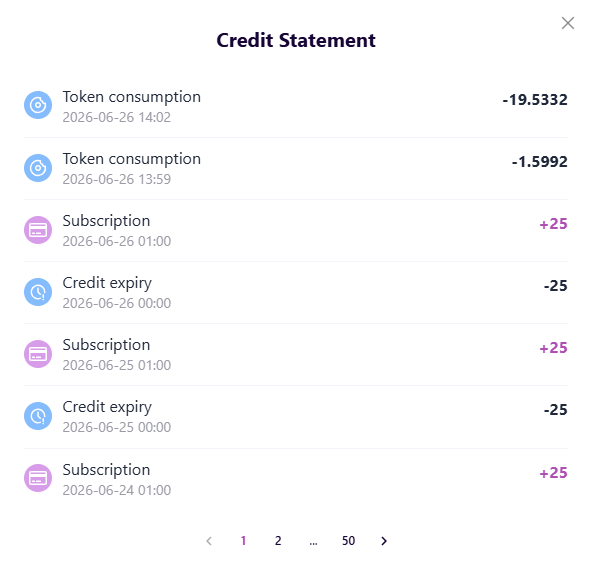
Open Billing to view your Credit Statement. It records:
- Daily plan-credit refresh and expiry—for example, "Subscription +25" at the start of the day and "Credit expiry −25" when the previous day's balance resets.
- Each token consumption entry, with the amount of credits spent.
For a per-request breakdown—the model used, prompt / completion / image / text tokens.